
Claude Code usage limits, read from your own numbers
Which limit you hit, where to see how much is left, and what you can do until it resets.
Last checked
The two windows
Anthropic's help center puts it plainly: both Pro and Max plans have a five-hour session limit and a weekly limit, and Max plans also have a separate weekly limit for Fable. The limits are shared across Claude and Claude Code, so chat on claude.ai counts against the same allowance.
Claude Code's status line documentation describes the same two windows as a rolling five-hour window and a weekly seven-day window, each with the share used and the time it resets. On Team and Enterprise plans, a seat's allowance resets on a rolling five-hour window and a weekly window too.
Usage counts against both windows at the same time, so a burst of heavy work can use up the weekly allowance before the session window resets. This guide gives no plan figures: they change, and your own numbers are the ones that count.
How to see your usage
- /usage
- Type
/usagein Claude Code. It shows session cost, plan usage limits, and activity stats, and on a subscription a breakdown of what counts against your plan limits. - Status line
A status line script receives
rate_limits.five_hour.used_percentageandrate_limits.seven_day.used_percentage, from 0 to 100, with aresets_attime for each. They are there only for Pro and Max subscribers, and only after the first response of a session. A minimal script, set up as the documentation shows:statusline.sh #!/bin/bash input=$(cat) five=$(echo "$input" | jq -r '.rate_limits.five_hour.used_percentage // empty') week=$(echo "$input" | jq -r '.rate_limits.seven_day.used_percentage // empty') [ -n "$five" ] && printf '5h %.0f%% ' "$five" [ -n "$week" ] && printf 'week %.0f%%' "$week"- Warnings
- Before a window runs out, Claude Code can warn you with a line such as
You've used 85% of your session limit · resets 3:45pm, as its error reference shows. - Every account at once
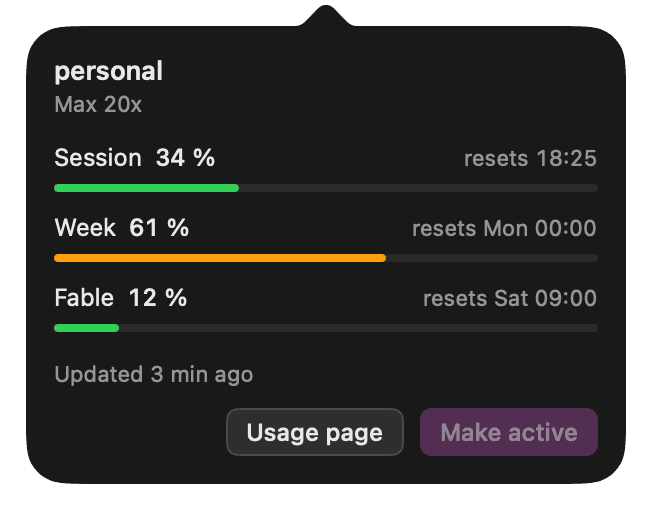
/usageand the status line show the account you are running. With more than one account, Altseat's menu bar lists the session and week of each one, read from the same status line fields, with their reset times.
What happens at the limit
Claude Code tells you which limit you hit and when it resets, with a message like these:
You've hit your session limit · resets 3:45pm
You've hit your weekly limit · resets Mon 12:00am
It blocks further requests until the reset time in the message. The session and weekly limits are shared across all models, so switching models with /model does not restore access. If the limit lands while Claude is partway through a response, it may keep working briefly to finish the step in progress, a small, capped allowance that is rolling out gradually.
In an interactive session signed in with a claude.ai subscription, Claude Code from v2.1.234 waits in the open session and continues the task after the reset, as long as you keep the session open. Press Esc at an empty prompt to cancel the wait.
Your options
- Wait for the reset. The message and
/usageshow when it comes, and Claude Code can pick the task up again by itself. - Work on something else. Review the changes so far, write the tests or the notes by hand, and come back after the reset.
- Usage credits or a larger plan. On Pro and Max,
/usage-creditsopens the settings where you turn on usage credits, paid usage past the limit. Anthropic also lists upgrading the plan, and API credits on a Claude Console account, as ways to keep working. - A second account of your own. A separate subscription you own, or one you are authorised to use, has its own limits; it adds nothing to the first account's. Claude Code runs it from its own configuration directory, as the guide to several accounts shows, and Anthropic's Consumer Terms say an account may not be shared or made available to anyone else.
- A handoff to your next account. With two or more accounts of your own added to Altseat, a Claude Code session that reaches 95 % of its session or weekly window writes a short handoff, ends after its current step and continues the same conversation on the next account with room, in the same terminal. Each account still keeps its own limits; the handoff runs between two Claude Code processes, never under a running one, and one switch turns it off.
Related
Every account's session and week, in the menu bar.
Altseat reads the same numbers for each Claude Code account, starts claude on one with room when the active one is at its limit, and hands a session over near the limit. Free for 2 accounts.
macOS 14 or later, Apple Silicon, zsh.