
Codex CLI accounts, side by side on one Mac
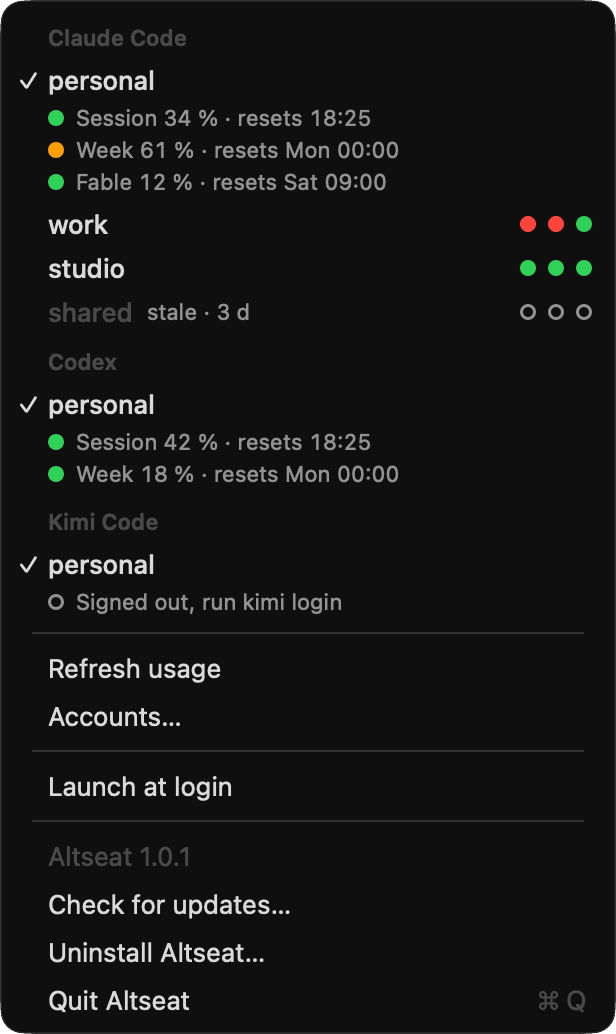
Each Codex CLI account stays signed in with the Codex CLI's own login, in its own directory with your sessions shared. Altseat shows each one's session and weekly usage in the menu bar and starts codex on an account that has room.
Free for 2 accounts. macOS 14 or later, Apple Silicon, zsh.
Last updated
What Altseat does with Codex CLI
- One directory per account
- Each account you add gets a directory of its own, such as
~/.codex-work, andcodexstarts withCODEX_HOMEset to it. OpenAI's documentation namesCODEX_HOMEas the place where Codex stores its local state,~/.codexby default; it does not describe a setup with several accounts. Your first account stays in~/.codex. - Usage from codex app-server
- Every 15 minutes while Altseat runs, it starts your own
codex app-serverfor each account, withCODEX_HOMEset, asks it foraccount/rateLimits/readand stops it again. The menu bar shows the session and weekly windows Codex reports, with their reset times. Refresh usage in the menu asks again, at most once a minute. Inside a session, Codex's own/statusshows the remaining limits of the account it runs on. - No token read
- Codex keeps each login in its own directory, in
auth.jsonunderCODEX_HOMEwith file credential storage. Altseat only checks that the file exists and never reads it; the usage request goes from the Codex CLI to OpenAI with that account's own sign-in. - Starts on an account with room
When the active account is at its session or weekly limit,
codexstarts the next account in your order that has room, makes it the active one and says so before Codex opens:codex altseat: personal is at its weekly limit, starting workWhen every account is at a limit, it starts the active one and names the first to reset.
- Shared sessions
- Every account links to
~/.codexforconfig.toml,AGENTS.md, agents, prompts, skills, sessions andhistory.jsonl. The login, Codex's SQLite state and memories stay with each account. With the sessions shared,codex resume --lastcontinues the most recent chat on whichever account starts; Codex looks in the current working directory unless you add--all.
Set up
- Download Altseat, drag it to Applications and open it.
- Choose Set up. It puts the
altseatcommand on your PATH and adds theclaude,codexandkimishell functions to~/.zshrc. If you are already signed in to Codex in~/.codex, that login becomes your first Codex account. Then open a new terminal window. Add an account in the Accounts window, or in the terminal:
altseat add work --provider codexIt creates
~/.codex-workand links the shared files into it.Sign in once, with Codex's own login:
CODEX_HOME=~/.codex-work codex logincodex logincompletes in the browser, with the ChatGPT account you sign in with there. Sign in in the Accounts window shows the same command with Open in Terminal.- Type
codexas always. Each account's usage shows in the menu bar within 15 minutes, or at once with Refresh usage.
What the codex function does
Set up writes one marked block into ~/.zshrc, between # >>> altseat >>> and # <<< altseat <<<. Its codex function runs altseat pick codex, which reads Altseat's settings and the last usage on your Mac, with no network call, and prints the directory of the account to start. The function then runs the real codex with CODEX_HOME set to that directory, or unset for ~/.codex.
codex login, codex logout and codex mcp, and --version and --help, run on your first account without a pick. When CODEX_HOME is already set, or altseat is missing or fails, the plain codex runs.
Uninstall Altseat in the menu takes the block out again. Your account directories and their logins stay.
Limitations
- Apple Silicon
- Altseat 1.x runs on Macs with Apple Silicon and macOS 14 or later.
- zsh only
- The shell functions are installed in zsh, the default shell on macOS. In bash or fish,
codexruns without the pick. - Chosen at launch
- Altseat picks the account when
codexstarts and never moves a running session to another account. At a limit, quit Codex and runcodex resume --last: the next account with room continues the chat. OpenAI notes that a turn already running can finish after the limit is reached. The automatic handoff Altseat does for Claude Code is planned for Codex, with no date yet. - Reported windows
- Altseat shows the session and weekly windows the app-server returns, and a window Codex does not report stays empty. OpenAI notes that Pro plans currently have no five-hour limit.
- Fresh numbers
- Usage refreshes every 15 minutes while the app is open. The
codexcommand picks from the last reading, with or without the app. - IDE extensions
- They start Codex without the shell function, so they run your first account.
Questions
Will this get my account banned?
Altseat works only with accounts you added and are authorised to use. It never shares a login, never handles a token for anyone else and never changes the login of a running process: a handoff ends Claude Code at a turn boundary before the next account starts. It adds no capacity: each account keeps its own limits.
Each account gets its own directory through the setting its vendor documents: CLAUDE_CONFIG_DIR, which Anthropic documents for running separate accounts, CODEX_HOME for Codex and KIMI_CODE_HOME for Kimi Code.
Whether several subscriptions suit your situation is between you and each provider: see Anthropic's consumer terms, OpenAI's terms of use and the Kimi Code membership guide.
Is it safe with my credentials?
Each tool signs in with its own login and keeps its own credentials. Altseat never sees a password and never writes, refreshes or copies a token.
By default it reads Claude usage from the status line Claude Code already runs, so it does not read the Keychain. Only the usage endpoint option, off by default, reads Claude's Keychain item, to ask Anthropic for that account's usage. Codex usage comes from the Codex CLI's own local app-server.
Altseat itself sends nothing anywhere except that optional request to Anthropic, the license check (the key, a one-way hash of the Mac's id, the Mac's name and the app version) and the update check.
Does Altseat need to stay open?
Not for switching: the claude, codex and kimi commands pick from the usage Altseat last recorded, with or without the app. Claude Code's status line keeps recording Claude usage while it runs, and the Claude Code handoff runs through Claude Code's hooks and the altseat command, with or without the app; the app adds the macOS notification.
The app shows the usage in the menu bar and refreshes Codex usage every 15 minutes, so keep it open for the freshest pick.
What does the free version do?
Everything, for 2 accounts in total across Claude Code, Codex CLI and Kimi Code, with no key and no sign-up. A license raises that to 10 accounts per tool on one Mac.
Related
Start with 2 accounts, free.
Add a second Codex account and keep typing codex: the menu bar shows each account's session and week from Codex's own app-server.
macOS 14 or later, Apple Silicon, zsh.