
The terminal runs on the account with room.
Several Claude Code, Codex and Kimi Code accounts on one Mac: each account stays signed in with its tool's own login, and Altseat never refreshes a token. It shows how much each Claude Code and Codex account has left in the menu bar and starts claude or codex on one that still has room.
Free for 2 accounts. macOS 14 or later, Apple Silicon, zsh.
$
Limits land in the middle of a task.
Claude Code plans have a five-hour session limit and a weekly limit, and Codex plans have usage limits of their own. With more than one subscription, the question is always which account still has room.
The manual way works: Anthropic documents CLAUDE_CONFIG_DIR for separate accounts, Codex reads CODEX_HOME and Kimi Code KIMI_CODE_HOME. What it leaves to you is the bookkeeping.
| One alias per account | Altseat | |
|---|---|---|
| Setting up | An alias per account and per tool, in your shell file | Each account added once, in the Accounts window or with altseat add |
| Usage | Each tool's own usage view, one account at a time | Session and week for every Claude Code and Codex account, in the menu bar |
| At a limit | Remember which account has room, then type its alias | In Claude Code, the agent writes a short handoff near the limit and the same conversation continues on the next account with room, in the same terminal. Otherwise type claude or codex as always: the next account with room starts, and the terminal says which |
| Settings and sessions | Each new directory starts empty; link what you share by hand | Linked to the tool's default directory, so claude -c continues on the next account |
Some open-source switchers swap the login under a running session, some need a Python or Node runtime, and some ship unsigned. Altseat acts only between processes, is one signed and notarized app, and comes with support and a 14-day refund.
Set up once. Then type the command you always type.
Altseat sits in the menu bar and in your shell. Your terminal habits stay as they are.
Set up and add your accounts
Set up puts the altseat command on your PATH and adds the claude, codex and kimi shell functions. Then add each account once: Altseat gives it its own directory and hands you the tool's own sign-in command.
altseat add work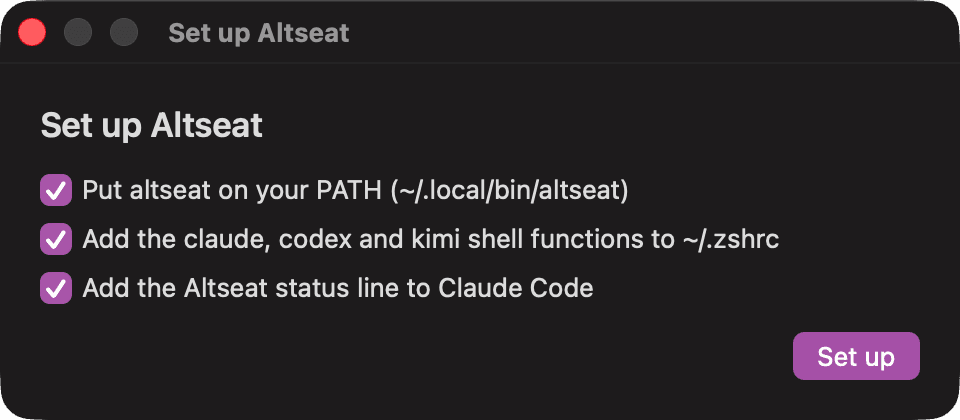
Set up window See every account's usage
The menu bar lists your accounts by tool, with the session and weekly usage Claude Code and Codex report and when each window resets. Kimi Code accounts show whether they are signed in.
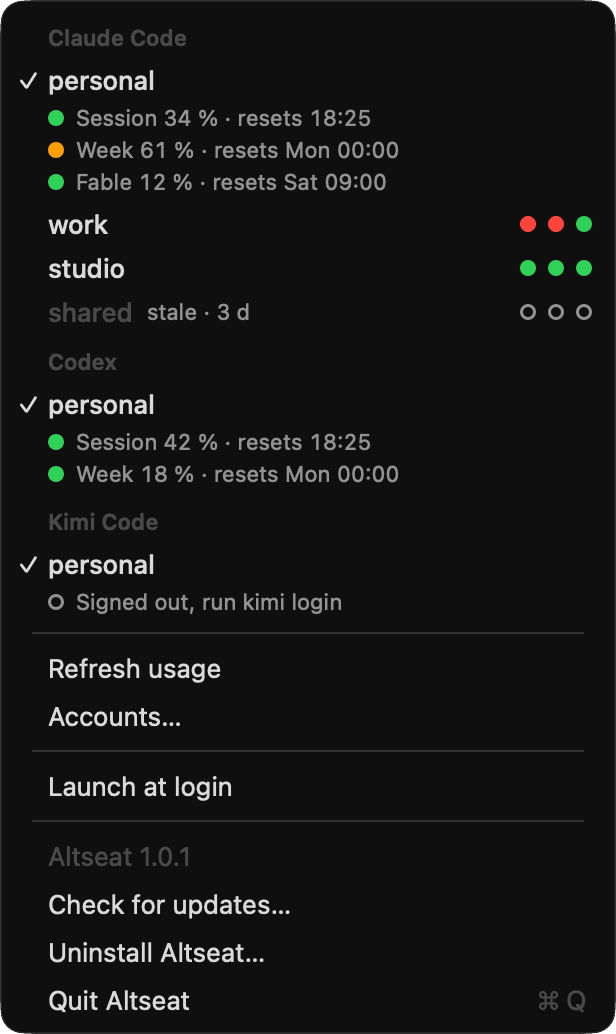
Menu bar dropdown Type
claude,codexorkimiThe command starts on the active account. When the active Claude Code or Codex account is at its limit, it starts the next account in your order with room and prints which one. Near its limit, a Claude Code session is handed over: the agent writes a short handoff, Claude Code exits after its current step, and the same conversation continues on the next account in the same terminal. Kimi Code has no usage reading, so kimi starts on the Kimi Code account you make active.
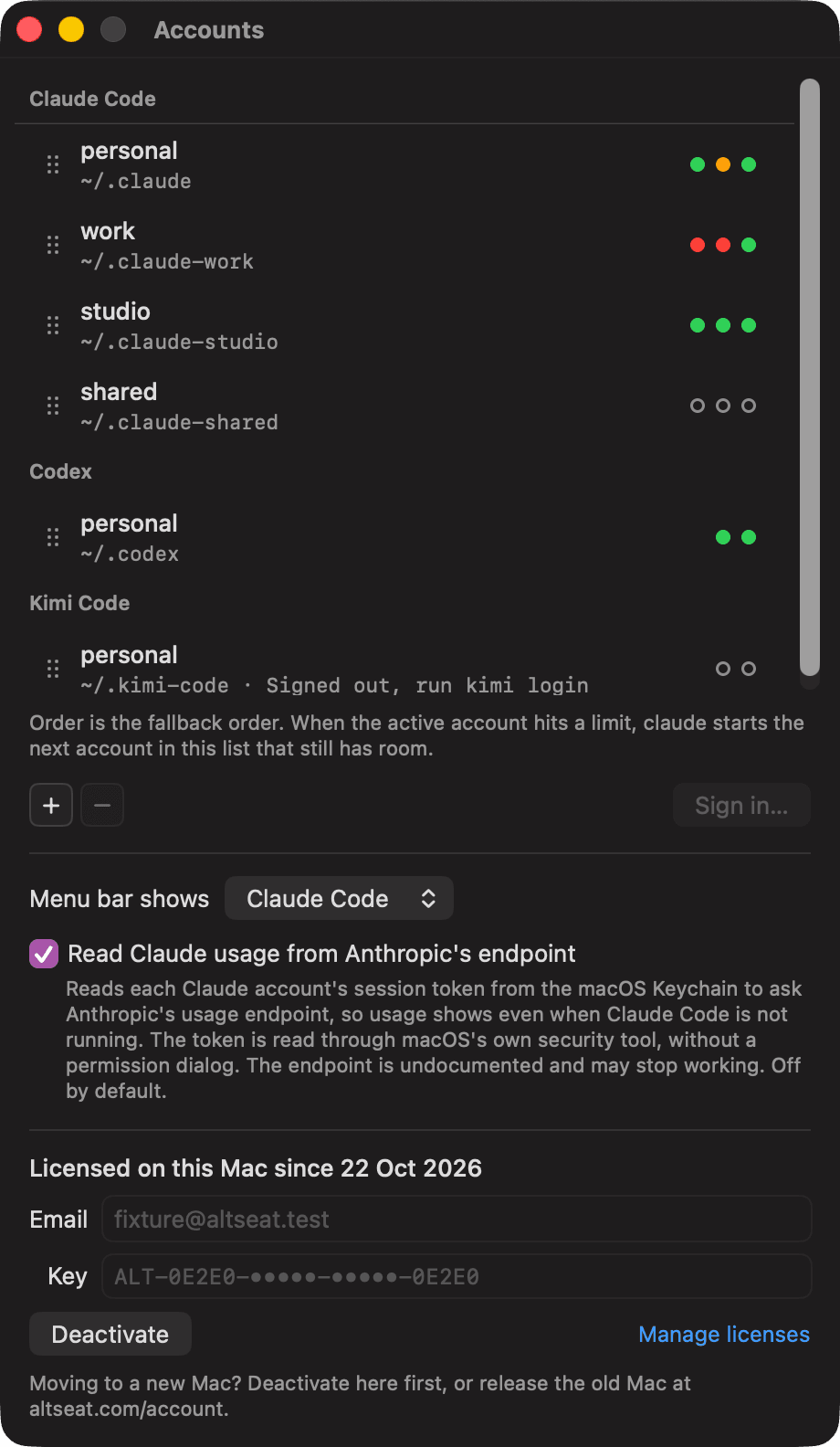
Accounts window
Each account's usage, and the next one with room.
Claude Code and Codex usage
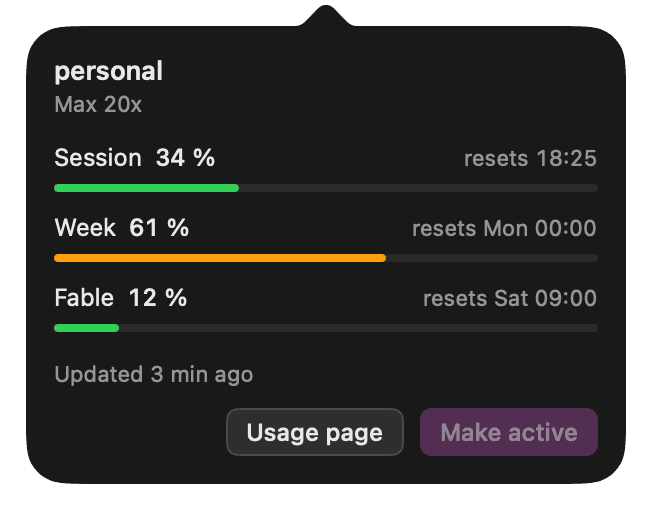
Session and week for each Claude Code and Codex account, with reset times, from the sources each tool offers. Open an account for its meters and plan.
Automatic handoff for Claude Code
When the active Claude Code account reaches 95 % of its session or weekly window and another one has room, the agent finishes its step and writes a short handoff, the session ends, and the same conversation continues on the next account in the same terminal. One line in the terminal says so, and one switch in the Accounts window turns it off.
Starts on an account with room
When the active Claude Code or Codex account is at its session or weekly limit,
claudeandcodexstart the next one in your order that has room, and the terminal says which.kimistarts on the Kimi Code account you make active in the menu bar.Only between processes
Altseat chooses an account when a command starts, or after Claude Code has ended at a turn boundary for a handoff. It never changes the login of a running process, and it uses only the accounts you added.
Settings and sessions shared
Every account links to the tool's default directory for settings, history and sessions, so
claude -c,codex resume --lastandkimi -ccontinue on the next account.MCP servers on every Claude account
altseat synccopies the primary account's MCP servers and project trust to your other Claude Code accounts, and everyclaudelaunch keeps them in step.Updates from the menu
Altseat looks for a new version once a day and installs it in place after checking its signature.
Claude Code, Codex CLI and Kimi Code.
Each tool runs as it ships, under its own command and its own login. Altseat switches all three, and reads usage where the tool offers it.
Claude Code
Switching, usage and automatic handoff
- Command
claude- Default directory
~/.claude- One directory per account
CLAUDE_CONFIG_DIR- Usage
- Session and week from the status line Claude Code documents. Fable and Anthropic's usage endpoint only if you turn it on.
- At a limit
- Near 95 % of a window, the agent writes a handoff and the same conversation continues on the next account with room, in the same terminal.
Codex CLI
Switching and usage
- Command
codex- Default directory
~/.codex- One directory per account
CODEX_HOME- Usage
- Session and week from the Codex CLI's own local app-server. No token leaves the Codex CLI.
- At a limit
codexstarts on the next account with room. The automatic handoff for Codex is planned.
Kimi Code
Switching and sign-in state
- Command
kimi- Default directory
~/.kimi-code- One directory per account
KIMI_CODE_HOME- Usage
- No usage reading yet. The sign-in state comes from Kimi Code's credentials file.
- At a limit
kimistarts on the Kimi Code account you make active.
Free for 2 accounts. A license for more.
Up to 2 accounts in total, Altseat is free. A third account, in any of the three tools, needs the license.
| Free | Lifetime license | |
|---|---|---|
| Accounts | 2 in total, across Claude Code, Codex CLI and Kimi Code | Up to 10 per tool |
| Macs | Any Mac you use | One Mac at a time per key; buy a key for each Mac |
| Features | Every feature | Every feature |
| Updates | Every 1.x update | Every 1.x update. If a 2.0 ever needs a new key, 1.x keys keep working with 1.x and get a reduced price. |
| Price | Free, with no key and no sign-up | USD 12 once, the launch price through 30 November 2026. USD 19 from 1 December 2026. |
One payment. No subscription.
Lifetime license
USD 12one-time
Launch price USD 12, then USD 19 from 1 December 2026. The license is the same at either price.
Lifetime means paid once with no renewal: the key keeps working on one Mac at a time, with every 1.x update.
- A license key for one Mac at a time
- Up to 10 accounts per tool
- Every update of the 1.x line
- Up to 10 keys in one purchase
- Refunds within 14 days, no questions asked
- Paddle is the merchant of record
By purchasing you agree to the Terms and the Refund policy.
macOS 14 or later, Apple Silicon, zsh.
After you buy
- Your key arrives by email at once, and is listed in your account.
- Download Altseat and open it.
- In the menu bar, open Accounts, then License.
- Paste the key, enter the email you paid with and choose Activate.
- Add up to 10 accounts per tool.
Lost a key? Account, or support@altseat.com
What Altseat reads, and what it never touches.
Each account is a directory of its own, signed in with the tool's own login and linked to the tool's default directory for everything you keep shared. That is the whole mechanism.
Reads
Account directories
One directory per account, signed in once with the tool's own login.
~/.claude-work~/.codex-work~/.kimi-work
Shared settings
Symlinks into each tool's default directory, so every account keeps the same settings and sessions.
~/.claude-work/settings.jsonlinks to~/.claude/settings.json~/.codex-work/sessionslinks to~/.codex/sessions~/.kimi-work/config.tomllinks to~/.kimi-code/config.toml
Usage
What Claude Code's statusline and the Codex CLI's own local app-server report. Kimi Code has no usage reading; its sign-in state comes from its credentials file.
codex app-server
Handoff files
The events Claude Code sends Altseat's hook while a session runs, to time the handoff, and the short handoff the agent writes near a limit. Both stay on your Mac; Altseat checks that the handoff file exists and never parses it.
~/.config/altseat/handoff
Claude's Keychain item
Read only when you turn on the usage endpoint option, to ask Anthropic for that account's usage. Off by default.
Kimi credentials file
Read for its expiry date only, to show sign-in state. Never sent anywhere.
~/.kimi-code/credentials/kimi-code.json
Never touches
Passwords
You sign in with each vendor's own login. Altseat never sees a password.
Writing or sending tokens
Altseat never writes, refreshes or copies a token. The one it can read, Claude's Keychain item with the usage endpoint option on, goes only to Anthropic.
Other people's accounts
Only the accounts you own and sign into yourself.
Network proxies
None. Each tool talks to its vendor directly, as it always does.
Signed, sold, supported
Stays on your Mac
Usage is read and kept on your Mac. The usage endpoint, off by default, asks Anthropic directly. No analytics on this site, no telemetry in the app: the privacy notice has the rest.
Signed and notarized
The app and the
altseatcommand are signed with a Developer ID and notarized by Apple.Paddle checkout
Paddle, the merchant of record, takes the payment, sends the receipt and handles sales tax, under its buyer terms.
Refunds and support
A refund within 14 days, no questions asked. Questions go to support@altseat.com.
Questions
Will this get my account banned?
Altseat works only with accounts you added and are authorised to use. It never shares a login, never handles a token for anyone else and never changes the login of a running process: a handoff ends Claude Code at a turn boundary before the next account starts. It adds no capacity: each account keeps its own limits.
Each account gets its own directory through the setting its vendor documents: CLAUDE_CONFIG_DIR, which Anthropic documents for running separate accounts, CODEX_HOME for Codex and KIMI_CODE_HOME for Kimi Code.
Whether several subscriptions suit your situation is between you and each provider: see Anthropic's consumer terms, OpenAI's terms of use and the Kimi Code membership guide.
Can't two lines of shell do this?
For switching, yes: an alias per account with CLAUDE_CONFIG_DIR works, and Anthropic documents it. Altseat adds what an alias leaves to you: the usage of every Claude Code and Codex account in the menu bar, a launch that skips an account at its limit and says which one it started, a Claude Code handoff near the limit that continues the conversation on the next account, settings and sessions shared across accounts, and the same switching for Codex and Kimi Code.
The free version covers 2 accounts, so you can set it against your aliases before you pay.
Is it safe with my credentials?
Each tool signs in with its own login and keeps its own credentials. Altseat never sees a password and never writes, refreshes or copies a token.
By default it reads Claude usage from the status line Claude Code already runs, so it does not read the Keychain. Only the usage endpoint option, off by default, reads Claude's Keychain item, to ask Anthropic for that account's usage. Codex usage comes from the Codex CLI's own local app-server.
Altseat itself sends nothing anywhere except that optional request to Anthropic, the license check (the key, a one-way hash of the Mac's id, the Mac's name and the app version) and the update check.
What happens when an account reaches its limit?
In Claude Code, the session moves near the limit. When the active account reaches 95 % of its five-hour or weekly window and another Claude Code account you added has room, the agent finishes the step it is on and writes a short handoff file, the session ends, and Altseat starts claude on the next account with room in the same terminal: the same conversation resumes there, the agent reads the handoff and carries on. One line in the terminal and, with the app open, a macOS notification say which account it moved to.
The handoff runs between two Claude Code processes: the first has exited before the next one starts, and Altseat never changes the login of a running process or uses an account you did not add. Each account keeps its own limits. One switch in the Accounts window turns the handoff off, as does altseat handoff off; then a session stops at the limit as it would without Altseat, the next claude starts the next account with room, and claude -c continues the conversation there.
Codex CLI and Kimi Code pick at launch only. When the active Codex account is at its limit, codex starts the next one in your order with room and prints which one, so codex resume --last continues the chat; an automatic handoff for Codex is planned. Kimi Code has no usage reading yet, so kimi starts on the active Kimi Code account; make another one active in the menu bar and kimi -c continues there.
Which tools does it support?
Claude Code: switching, usage and the automatic handoff. Codex CLI: switching and usage; its automatic handoff is planned. Kimi Code: switching and sign-in state, with no usage reading yet. Gemini CLI is not supported.
Does Altseat need to stay open?
Not for switching: the claude, codex and kimi commands pick from the usage Altseat last recorded, with or without the app. Claude Code's status line keeps recording Claude usage while it runs, and the Claude Code handoff runs through Claude Code's hooks and the altseat command, with or without the app; the app adds the macOS notification.
The app shows the usage in the menu bar and refreshes Codex usage every 15 minutes, so keep it open for the freshest pick.
Does it run on Intel Macs?
No. Altseat 1.x needs a Mac with Apple Silicon and macOS 14 or later.
Does it work with bash or fish?
No. The claude, codex and kimi shell functions are installed in zsh, the default shell on macOS. In bash or fish the commands run without Altseat's pick.
What does the free version do?
Everything, for 2 accounts in total across Claude Code, Codex CLI and Kimi Code, with no key and no sign-up. A license raises that to 10 accounts per tool on one Mac.
Are updates included, and what about 2.0?
Every 1.x update is included, for free and licensed users alike, and the app offers each one from the menu.
If a 2.0 ever needs a new key, 1.x keys keep working with 1.x and get a reduced price.
Can I use Altseat on more than one Mac?
The free version works on any Mac. A license key is active on one Mac at a time: for two Macs, set the quantity to 2 at checkout, and every key arrives in the same email.
To move a key, deactivate it in the old Mac's Accounts window, then paste it into the new one. If the old Mac is lost or no longer starts, release the key from your account page, once every 24 hours per key.
Where are my keys?
In the email that arrives as soon as you buy, and in your account. Sign in with the email you paid with and every key you bought is listed there.
Can I get a refund?
Yes, within 14 days of your purchase, no questions asked. Use the link in your Paddle receipt or write to support@altseat.com. Paddle, our merchant of record, issues the refund and the key is revoked.
Start with 2 accounts, free.
Install Altseat, add two accounts and keep typing claude or codex: the menu bar shows each account's usage as soon as the tool reports it.
Free for 2 accounts. USD 12 once for more.
macOS 14 or later, Apple Silicon, zsh.